Attendance registers
Enable Attendance and open the attendance register in the intended campus. Use read attendance to open the register and take attendance to record or correct it. The current register screen records daily section attendance. Lesson attendance exists in the underlying attendance service, but this screen has no lesson-register selector.
Before you start
Select the working academic cycle and check the teaching period's status. The section and date must resolve valid enrollment and placement history. Future dates, published closure days, and Closed periods prevent ordinary attendance writes. The campus's detailed attendance configuration can also disable daily registers.
Save the daily register
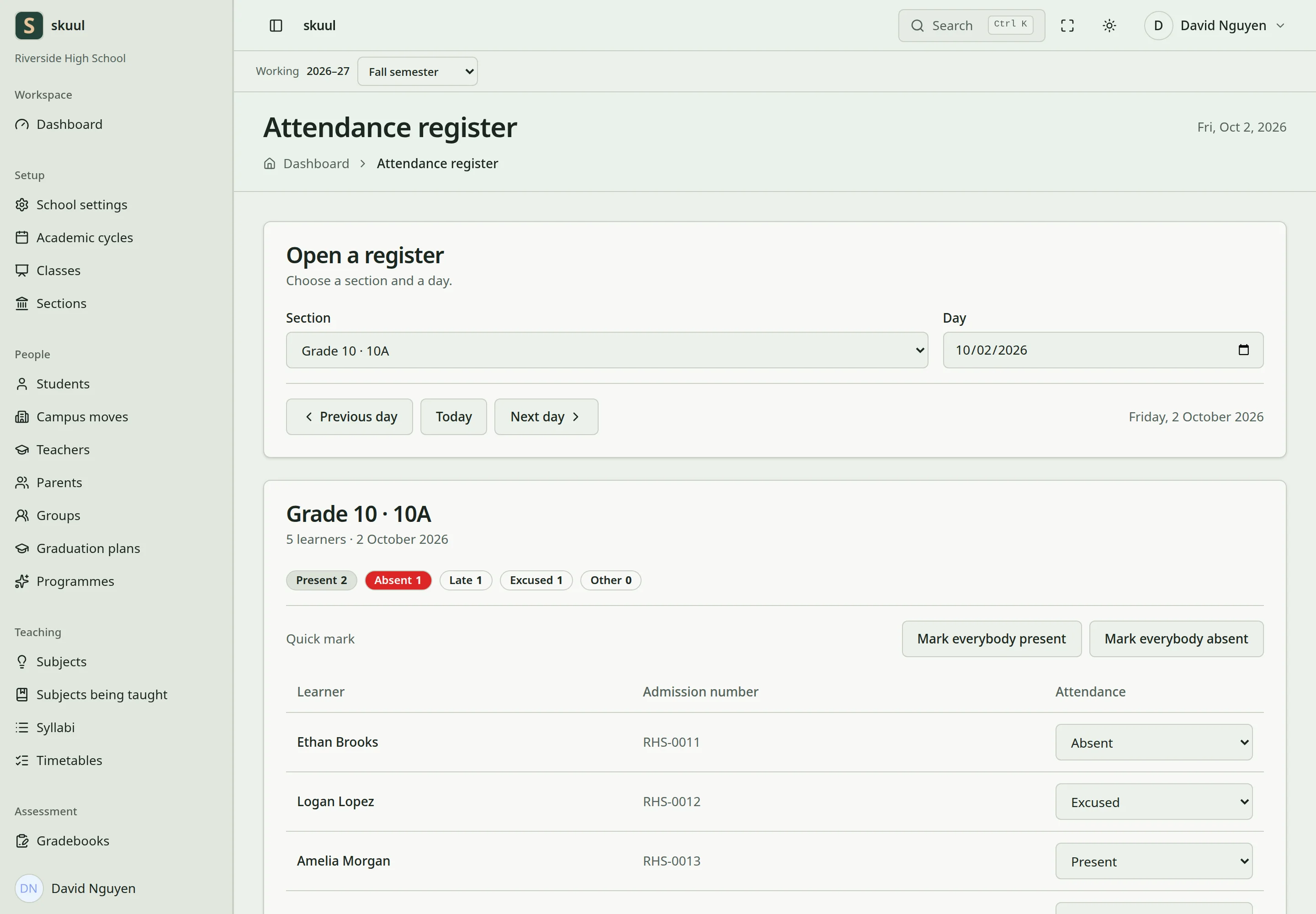
Use explicit attendance states and review unrecorded entries.
- Select Section and check the displayed level and section name.
- Select Day, using today or an earlier valid date.
- Review the learners against their placement on that date.
- Select each learner's attendance state.
- Review the attendance totals and unrecorded count.
- Select Save register.
- Read the save result, then reload the same section and date.
Today restores the current campus date. The arrow controls move one day backward or forward. Mark everybody present and Mark everybody absent set every displayed learner to that state. After using either bulk control, correct exceptions before saving. Selecting a state changes the form; Save register records it.
| State | Use | Counts as present |
|---|---|---|
| Present | Attended normally. | Yes |
| Absent | Did not attend. | No |
| Late | Arrived late. | Yes |
| Excused | Authorized absence. | No |
| Left early | Attended and departed early. | Yes |
| Remote | Attended remotely. | Yes |
| School activity | Attended an eligible school activity. | Yes |
| Not recorded | No attendance decision entered. | Excluded |
Only Not recorded is excluded from the rate denominator. Excused remains in that denominator. Example: Present, Late, Absent, Excused, and Not recorded give two present entries out of four recorded entries: 50%. An absent register does not automatically record every learner as Absent. Check register coverage alongside the percentage.
Correct a saved entry
- Open the same section and original attendance date.
- Check the learner identity and historical placement.
- Change the incorrect state.
- Select Save register.
- Reload and confirm the corrected state.
The application retains attendance change history. The original campus owns its registers after a learner moves elsewhere. Work in that owning campus with the required permission to correct the old record.
| Problem | Action |
|---|---|
| Save register is absent | Check take attendance and the period's writable state. |
| No learners appear | Check section, date, current cycle, and eligible placement history. |
| Day is refused | Correct a future date or check the published closure calendar. |
| Percentage seems too low | Remember that Excused remains in the denominator. |
| Percentage seems too high | Review unrecorded learners and missing registers. |
| Lesson-register selector is absent | The current screen exposes daily attendance only. |
Families read eligible attendance when Attendance and the Attendance portal area are enabled. See closure days, campus moves, and family portal.